Manage the Expiration Date of Your Gifts
Last updated: June 15, 2026
Understanding Expiration Dates
The recipient can choose the gift card from the gift you sent him within 24 months from the send date.
After choosing the gift cards from the gift link, the expiration date changes according to the selected brand's terms.
As long as the gift is valid, the recipient can choose the gift cards he likes, you can repurpose the gift for another recipient or cancel the gift and get the funds back into your account.
You can shorten the expiration date of your gift by following these steps:
The expiration date for existing templates:
1. Go to the Send a Gift tab.
2. Choose a template.
3. Set up the expiration date.
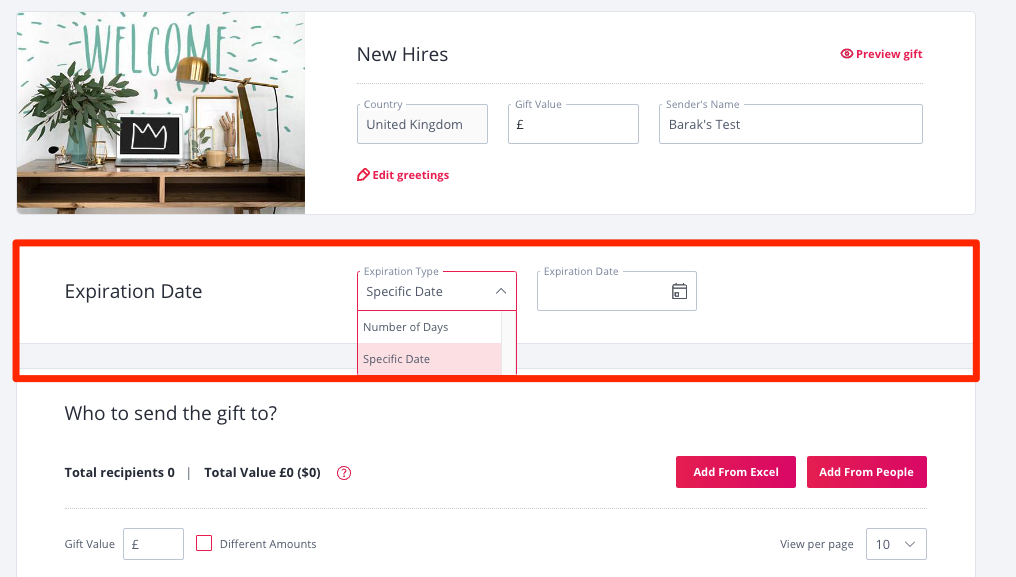
You can set up the expiration date by choosing a specific date or setting up a number of days. The gift will become invalid after this date. If you select a number of days, make sure to choose enough days to give your recipient enough time to select the gift.
The expiration date for new templates:
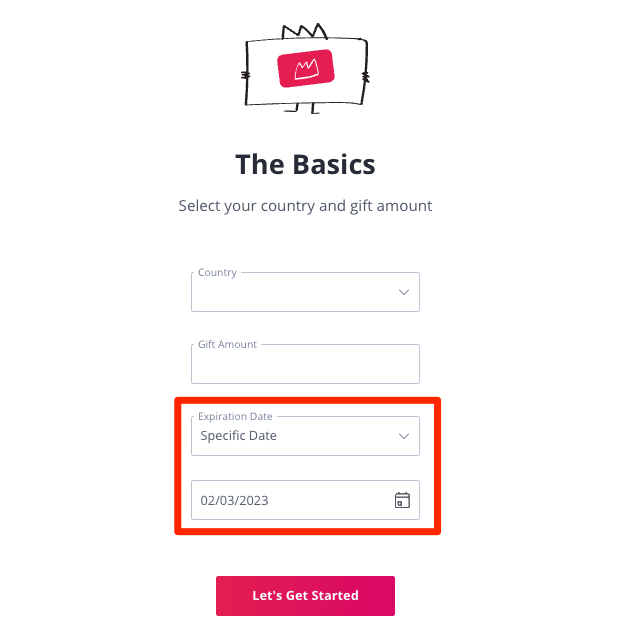
If you create a new template from the Send a Gift tab, you can choose a shortened expiration date by following the steps below:
1. Go to the Send a Gift tab.
2. Click on 'To Send a Gift - Start Here'.
3. Set up the Country, Amount, and Expiration date.
You can set up the expiration date by choosing a specific date or setting up a number of days. The gift will become invalid after this date. If you select a number of days, make sure to choose enough days to give your recipient enough time to select the gift.
4. Continue with personalizing the gift.